2026Case study
CompletedSmart Track Organizer Pro
A REAPER session organizer that classifies, renames, colours and groups tracks with a 150+ term studio lexicon and a pure-Lua dashboard.
The problem
A messy DAW session is a tax on the rest of the mix. Tracks arrive with names like snr_top_raw_01, Audio 01 or gtr_ac_st_mic_L, and before anyone can mix, someone has to rename, colour, sort and folder them by hand. The rules are domain-specific: a bass DI is not a bass synth, a vocal double is not a lead, and DI, FX, MIDI and OH are not noise to be stripped out.
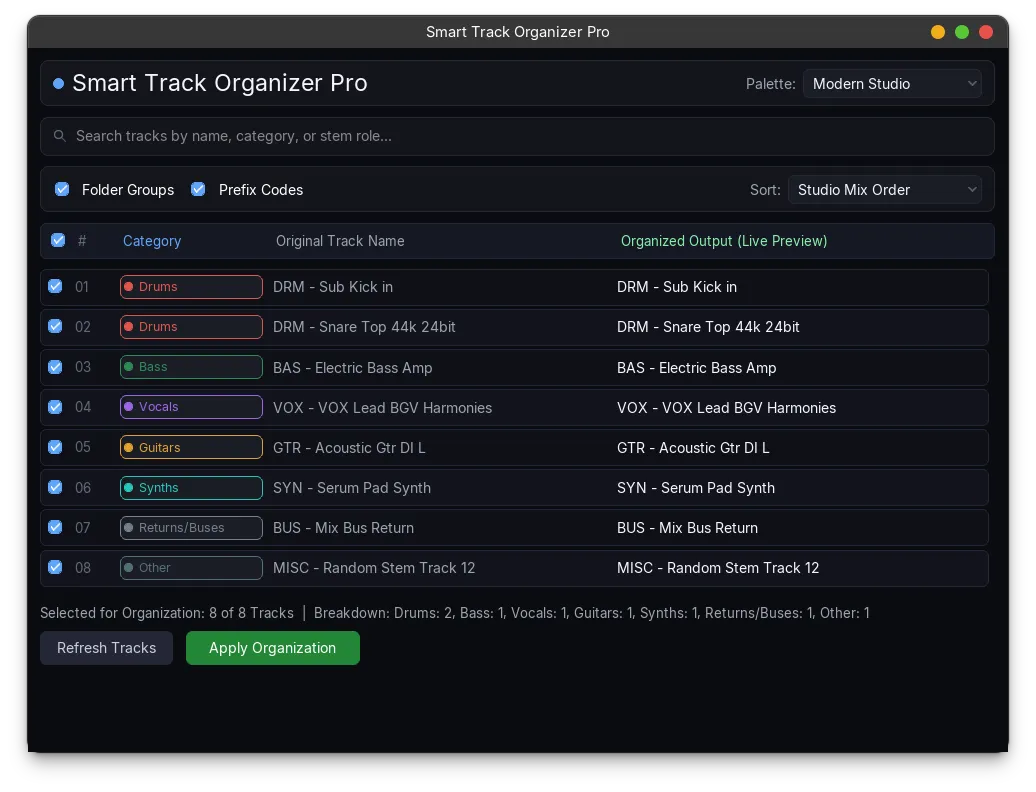
Smart Track Organizer Pro is a REAPER extension that does that cleanup automatically, with a live preview so the user can see exactly what will change before applying it.
What I built
A pure-Lua REAPER extension with a three-layer architecture: a classification and sorting core, a REAPER adapter, and an RTK-based dashboard. The classifier recognises more than 150 stems and shorthand terms across 11 studio categories, and uses the loaded VST/AU instruments as extra clues when a track name is ambiguous. It preserves audio-engineering acronyms while removing take numbers, duplicate numbering and other clutter.
The dashboard adds five studio colour palettes, multi-strategy sorting (studio mix order, vocal-first, alphabetical and original order), automatic parent-folder creation with correct REAPER folder depth, per-track selection and search, and a single-step undo/redo that restores the session without corrupting routing or existing folders.
The project is self-contained pure Lua with bundled RTK and no external binaries. It has a test suite for the classifier, lexicon, palettes, adapter, folder-depth maths, UI state and edge cases.
The hard part
Classification is the product. A rule set that works on clean names falls apart on real sessions, where the same instrument can appear as a shorthand, a plugin name, a room mic, a doubled take or a bus. The FX-chain inspection was the answer to the worst case: a track called Audio 01 with Serum loaded is probably a synth, not a mystery.
The second hard part is applying the plan safely. Renaming, colouring, sorting and folder creation all mutate the same session graph. The undo block has to restore the original state as one action, and the folder-depth calculations have to be correct even when tracks are already inside folders.
Decisions
- Pure Lua, no binaries. The extension should install and run inside REAPER without a build step or a platform-specific dependency.
- A lexicon as data, not scattered rules. The classification vocabulary lives in its own module so it can grow without turning the core into a pile of conditionals.
- FX-chain clues for ambiguous names. When the name is not enough, the loaded instrument is the next best signal.
- A live preview before applying. The user sees the proposed names, categories and colours before anything changes.
- One undo block. The whole operation is atomic from the user’s point of view.
Outcome
The project delivered a working REAPER extension with the classification engine, five palettes, four sorting strategies, folder automation, live preview, search and selection, and undo/redo. It is co-developed with Rahul and covered by a test suite.
What I’d do differently
I would test against more real, messy sessions earlier. The classifier is only as good as the names it has seen, and the edge cases in real sessions are more useful than another clean fixture.
Next project